When an agent runs, I think about the cost.
Of course, we all know tokens cost money, but the price of using LLMs isn’t only financial. Running these models requires computing power, electricity, and cooling infrastructure. Every token consumes resources on Earth. Mostly fossil fuels.
Watching an agent reason through the same predictable task again and again feels wasteful. If a process is sufficiently predictable, ordinary code is often faster, cheaper, more consistent, and easier to trust.
Yet when a tool doesn’t exist for the task at hand, it’s easy to let an agent handle it in the moment.
For example, if I needed to inspect a potentially infected website backup, an agent could unpack the archive, compile my YARA rules, scan the files, and analyze and report the findings.
After doing this a few times, however, most of the workflow is clearly deterministic. A simple shell script can handle the extraction, rule compilation, and scanning, leaving the agent to focus only on interpreting results.
To not fall into the trap of burning tokens needlessly, I’ve set myself a simple goal:
If I ask an LLM to perform the same task three times, I treat that repetition as a signal for automation. In most cases, I even use the LLM to automate the deterministic parts, then reserve future tokens for decisions that genuinely require judgment.
In this way, I think about tokens in terms of their return on investment.
Spend tokens now to automate a process and reduce the number of tokens that the process requires in the future.
The Workflow:
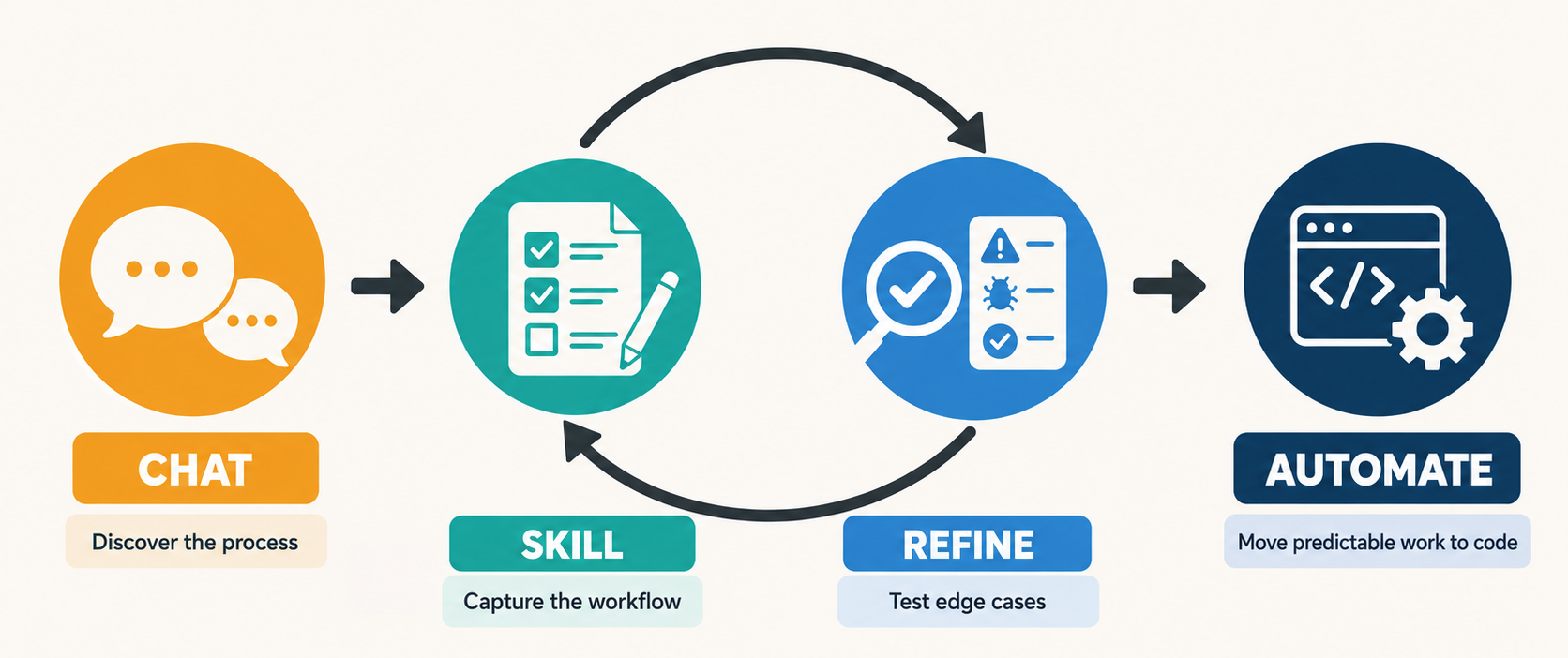
1. Solve the problem in a chat
The first interaction is a chat where I’m simply trying to have an LLM complete the task.
I explain what I want, answer its questions, correct its mistakes, and continue until I get the desired outcome for my first task.
In chat, the process begins to take shape. I learn which instructions, inputs, decisions, and exceptions matter. I also discover what context the LLM needs to produce the result I want.
2. Turn the process into a skill
Once the LLM can perform the task correctly in chat, I ask it to turn the process we developed into a reusable SKILL.md file and configure an agent that can use the skill.
It captures the workflow, inputs, and expected outcome from the chat’s context, so I don’t have to reconstruct the entire process in a new conversation.
I might refine the skill manually if I see any ambiguous instructions, but it’s usually good enough to start using.
3. Test the agent and refine the skill
Next, I give the agent the same type of task several more times and point it to the skill.
Each use exposes missing instructions, incorrect assumptions, and edge cases that didn’t appear in the original conversation.
I update the skill as needed until the behavior and output become reasonably predictable.
4. Turn the skill into code
The skill already documents the requirements, steps, edge cases, and expected output, so I give it to an LLM and identify which parts can be automated. Then have it build an appropriate tool.
The automation may replace the entire workflow, or it may handle only the predictable parts, leaving ambiguous decisions to the agent.
For example, in the backup-scanning workflow, I could update the skill so the agent uses a script to unpack and scan it, and then asks the agent to interpret and report only the results that require judgment.
As a result, either I use the automated tool or an agent uses it as part of its skill instructions. Either way, the agent no longer needs to spend tokens working through steps that ordinary code can perform more reliably.
It’s a simple, effective system that’s helped me reduce a significant amount of typing and clicking in my day-to-day incident response workflows, so I hope you find it helpful!


Leave a Reply