
When working in malware removal, you start to notice patterns and develop an instinct for spotting malicious code that can slip past automated detection methods.
While scanners are effective at detecting most malware, they’re just one piece of the puzzle. Malware is constantly evolving, always aiming to stay hidden from scanners—that’s one of its main objectives. That’s why it takes real people who go beyond the scanner to detect any missed threats, thoroughly clean and secure sites, and report anything that might be overlooked so scanners can detect new variations.
“security is a process, not a product”
Bruce Schneier
In this post, I’ll share key things I look for when investigating a compromised WordPress installation, helping you uncover malware that might have slipped past your scanner.
1. Obfuscation
Malware often uses obfuscation to stay hidden, making it difficult to see what the code is actually doing. While legitimate developers might occasionally obfuscate code for security, leading to false positives on WordPress malware scanners, malware takes it to the next level, using unreadable code, disabling error reporting, and hiding files in unusual ways. Spotting these methods is key to cleaning a WordPress malware infection.
Code Obfuscation
One of the most common signs of WordPress malware is code obfuscation. Normally, even if you’re not an expert developer, you can get a sense of what the code is doing by looking at the class and function names e.g. get_post_meta(), wp_enqueue_script(), or the_content(). Developers typically name functions in a way that makes their purpose clear, easy to understand, and even add plain English comments in the code to help clarify what’s happening.
With malware, though, you’ll often find code that looks like gibberish—long strings of characters that don’t make any sense at first glance. For example:
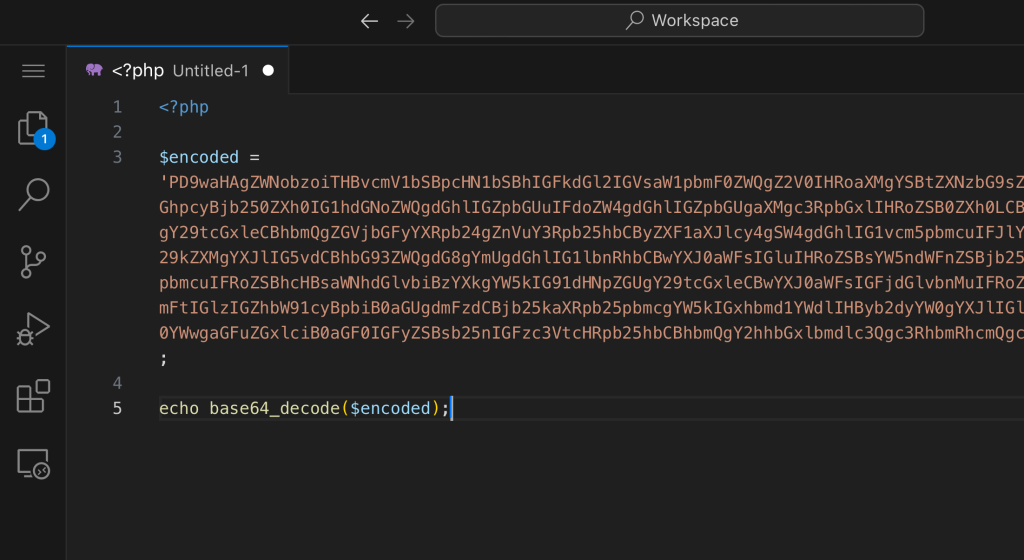
This kind of obfuscation is deliberate and designed to hide the true purpose of the code. If you come across code that’s hard to read, especially if it’s heavily encoded or using obscure functions, it’s a strong indicator you’re dealing with malware.
Malware often stacks encoding tricks like rot13 or gzinflate on top of base64 to make the code even harder to spot and analyze. So, be on the lookout for these functions that obscure the code. These are often paired with functions like eval() or preg_replace() (with the /e modifier) to execute hidden commands.
Again, when you see something like this:
eval(base64_decode('aWYgeW91IGZvdW5kIG1lLCBsZWF2ZSBhIGNvbW1lbnQhIFBsZWFzZSBjb21tZW50IGFuZCBsZXQgbWUgbm93IQ=='));…it’s a major red flag, and odds are it’s malware. I promise you the code above is harmless if your’e curious, but hesitant to know what it says. 🙂
Error Reporting Obfuscation
Malware loves to stay hidden, and one way it does this is by disabling PHP error reporting. This prevents any warnings or errors from popping up that could clue website owners and admins into its presence.
Watch out for lines of code like @ini_set('display_errors', 0); or error_reporting(0); buried in your theme or plugin files. If error reporting is disabled and accompanied by base64 encoded strings; it’s likely malware.
Error suppression not only hides warnings and errors from view but can also interfere with logging, making it much harder to trace malicious actions or debug issues, essentially leaving you in the dark about what’s really happening on your site.
File Obfuscation
Another way malware stays hidden from scanners is by including PHP files in ways that evade scan detection. For example, I once encountered a case where a PHP file was included from within a .zip file, and we caught this unusiual include, but since scanners typically don’t look inside zip files, the malware inside—complete with obfuscated code that disabled error reporting and acted as a backdoor—went undetected.
WordPress malware can also hide in seemingly harmless files, like .GIF or .txt, which can’t execute code on their own. However, these files are often referenced by another PHP file using functions like eval(), making them important for understanding how the malware operates and whether it’s calling other files that also need to be removed.
Malicious files are often strategically placed within plugin directories, meticulously designed to blend in with legitimate code. For example, I once discovered a file named oauthentication.php within the authentication folder of a legitimate plugin. At first glance, it appeared harmless, but a closer inspection of the server logs uncovered an HTTP request targeting this file, along with a query string ?action=edit linked to known malicious files. That single HTTP request in a sea of thousands tipped me off that this file was, in fact, part of a malware operation.
If you notice unusual file includes within your WordPress installation, especially in directories like wp-includes, it’s definitely worth a deeper investigation. Pay close attention to your server logs; they can reveal critical clues, such as HTTP requests targeting unexpected files or unusual query strings. The presence of a file being included from a zip, disguised in a non-PHP file, or executed with eval() is a clear sign that something is off and warrants further examination.
Directory Obfuscation
Malware can take advantage of directories to stay hidden by exploiting several gaps in the scanning process:
- Scanners might skip directories flagged as caches.
- Directories containing files named
.donotbackupcould be overlooked. - Large backup directories may be excluded to save resources.
- Directories without proper read permissions can be inaccessible to scanners.
These gaps create potential hiding spots for malware that can easily be missed. Manually checking these directories is the only way to ensure nothing malicious is left behind, reinforcing the need for thorough security practices beyond automated scans.
Legitimate Obfuscation
While it’s not common, some legitimate plugin developers might obfuscate their code for security reasons, to hide licenses, or to keep their code proprietary. They might use obfuscation to protect sensitive logic or prevent piracy, but the code’s comments might still clearly explain its intent. This kind of obfuscation can sometimes trigger scanners, but these are usually just false positives. Malicious code, on the other hand, tends to obfuscate everything—entire files filled with unreadable code—making it a clear sign of something nefarious.
2. Randomly Named Files and Directories
Malware often hides in numbers by spreading across multiple directories, creating numerous files with random, alphanumeric names like hfu7YGks.php that are clear signs of automation. The more it spreads, the easier it is to miss at least one file, especially when they’re scattered across the entire installation like wp-includes, wp-admin, and wp-content/uploads. These hidden files can be easily overlooked, leaving malware undetected.
Sometimes, malware tries to disguise itself by using legit-looking names like style.php or index.php. However, those familiar with basic web development know that PHP isn’t used for styles—style.css is the norm. So if you find a style.php file in your WordPress installation, it’s almost certainly malicious.
Malware uses these misplaced PHP files to blend in and operate unnoticed. Always be vigilant for new files or plugins that seem out of place, as they often point to deeper issues that need attention.
3. Injection into Legitimate WordPress Files
Aside from creating new files, another common tactic with WordPress malware is injecting malicious code into legitimate files. This injected code is designed to blend in with the existing code, making it harder to spot than randomly generated files and less likely to raise immediate suspicion.
Typically, this injected code appears at the top of the file, enclosed within opening and closing PHP tags. Sometimes, the injection is further obscured by adding a lot of whitespace, pushing the code far to the right in the editor. This means you may need to scroll horizontally to even notice it.
A good way to detect these injections is by checking the last modified dates on your plugin or theme files. I’ve seen this countless times in files like wp-config.php, the index.php files in nearly every plugin or theme directory, the theme’s functions.php, and even core files. Malware often attaches itself to these legitimate files to remain undetected. If a file was recently modified but your plugin or theme hasn’t been updated, there’s a good chance it’s been compromised with an injection.
4. Fake WordPress Plugins and Themes Malware
If your admin account is compromised due to a weak password, hackers often upload fake plugins with backdoors, allowing them to regain access to your site later. These fake plugins can execute malicious code, create new backdoors, or spread malware to other parts of your site.
They often masquerade as legitimate plugins like “Hello Dolly” or use names like “WordPress Core” or “Advertisements.” While you might spot them on your wp-admin plugins page, don’t rely on that alone—always check the wp-content/plugins directory directly. Malware can sometimes hide entire plugins from both the wp-admin plugins page and WP-CLI, making them harder to detect. By manually inspecting the directory, you can uncover and remove these hidden threats before they cause further damage.
5. Backdoors
Backdoors are one of the most persistent forms of malware because they allow attackers to maintain access to your site even after the initial infection is removed. These can be hidden in new or existing files, sometimes disguised as part of the WordPress core or a legitimate plugin, like we discussed with fake plugins and themes.
Backdoors sometimes hide in plain sight within your code, without any obfuscation. They might include a URL to a remote server directly in the code, making it relatively easy to spot if you know what to look for. Look out for functions like file_get_contents(), wp_remote_get(), wp_remote_post(), curl_exec(), or fopen() that are being used to communicate with external servers. These URLs are used by attackers to communicate with the compromised site, execute commands, or exfiltrate data.
I’ve seen backdoors that dynamically generate admin users and then hide the user from both the wp-admin users.php page and the WP-CLI user list. Because of this, it’s vital to check the database’s wp_users table directly for any suspicious users if your site has been compromised. Additionally, scanning your files for hardcoded URLs or suspicious external server calls can help you identify these backdoors.
Taking these extra steps can help you uncover and remove backdoors that might otherwise go unnoticed, ensuring your site is fully secure.
These are just a few of the most common patterns I’ve encountered over years of removing malware from sites. If you have access to server logs, be sure to check them around the time the malware appeared for any suspicious activity—they can often reveal additional hidden files in your WordPress installation. But that’s a topic for another post.
Remember, prevention is your best defense. To keep your WordPress site secure, adopt a multilayered approach: keep everything up to date—plugins, themes, WordPress core, PHP, and third-party libraries. Limit the number of plugins you use, and always choose reputable ones. Strong, unique passwords, two-factor authentication, and regular audits of your site’s users—especially admins—are essential practices for maintaining your site’s security.
Leave a Reply